
Appearance
Download or Schedule Reports
Downloading a report
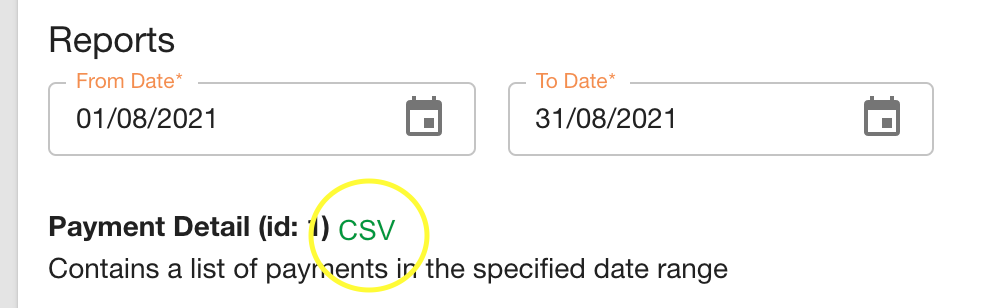
To download a schedule report, navigate to "Reports" on the menu bar.

Under "Reports" choose the report period to be downloaded and click the format link to download it.
Adding a scheduled report
To add a schedule report, navigate to "Reports" on the menu bar.

Under "Create a Schedule Report" choose the report type, period, cron expression, report format and the emails you would like the report to be sent to.

Report period defines how long the report will run for and cron expression defines how often.
Report period should follow the format "1d" for 1 day, "1m" for 1 month and "1y" for 1 year.
Cron Expression Help
Check the last section of this page for a quick guide on Cron expressions.
Quick introduction to Cron expressions
A cron expression consists of five fields:

It can accept numbers and special characters:
- * (all) specifies that event should happen for every time unit. For example, "*" in the minute field means "for every minute."
- ? (any) is utilized in the day-of-month and day-of-week fields to denote the arbitrary value and thus neglect the field value. For example, if we want to fire a script at "5th of every month" irrespective of what day of the week falls on that date, we specify a "?" in the day-of-week field.
- – (range) determines the value range. For example, "10-11" in the hour field means "10th and 11th hours."
- , (values) specifies multiple values. For example, "MON, WED, FRI" in day-of-week field means on the days "Monday, Wednesday and Friday."
- / (increments) specifies the incremental values. For example, a "5/15" in the minute field means at "5, 20, 35 and 50 minutes of an hour."
- L (last) has different meanings when used in various fields. For example, if it's applied in the day-of-month field, it means last day of the month, i.e. "31st of January" and so on as per the calendar month. It can be used with an offset value, like "L-3", which denotes the "third to last day of the calendar month." In day-of-week, it specifies the "last day of a week." It can also be used with another value in day-of-week, like "6L", which denotes the "last Friday."
- W (weekday) determines the weekday (Monday to Friday) nearest to a given day of the month. For example, if we specify "10W" in the day-of-month field, it means the "weekday near to 10th of that month." So if "10th" is a Saturday, the job will be triggered on "9th," and if "10th" is a Sunday, it will trigger on "11th." If we specify "1W" in day-of-month and if "1st" is Saturday, the job will be triggered on "3rd," which is Monday, and it will not jump back to the previous month.
- # specifies the "N-th" occurrence of a weekday of the month, for example, "third Friday of the month" can be indicated as "6#3".
Cron Calculator
For a quick calculation of Cron expressions, visit crontab.guru
Examples
At 12:00 p.m. (noon) every day:
0 12 * * ?Every five minutes starting at 1 p.m. and ending at 1:55 p.m. and then starting at 6 p.m. and ending at 6:55 p.m., every day:
0/5 13,18 * * ?Every minute starting at 1 p.m. and ending at 1:05 p.m., every day:
0-5 13 * * ?At 1:15 p.m. and 1:45 p.m. every Tuesday in the month of June:
15,45 13 ? 6 TueAt 9:30 a.m. every Monday, Tuesday, Wednesday, Thursday and Friday:
30 9 ? * MON-FRIAt 9:30 a.m. on the 15th day of every month:
30 9 15 * ?At 6 p.m. on the last day of every month:
0 18 L * ?At 6 p.m. on the third to last day of every month:
0 18 L-3 * ?At 10:30 a.m. on the last Thursday of every month:
30 10 ? * 5LAt 10 a.m. on the third Monday of every month:
0 10 ? * 2#3At 12 midnight on every day for five days starting on the 10th day of the month:
0 0 10/5 * ?