
Appearance
Modifying User Permissions
Built-in Teams
A user is granted permissions according to the teams they are a member of. There are 3 built-in teams which grant the following capabilities:
Agent
- View transactions
- Take phone payments
Supervisor
- View transactions
- Take phone payments
- Set / override transaction fees
- Refund transactions
Admin
- View transactions
- Take phone payments
- Set / override transaction fees
- Refund transactions
- Configure global site settings
- Run transaction reports
- Review system audit logs
- Edit users and permissions
Adding or removing a user from a team
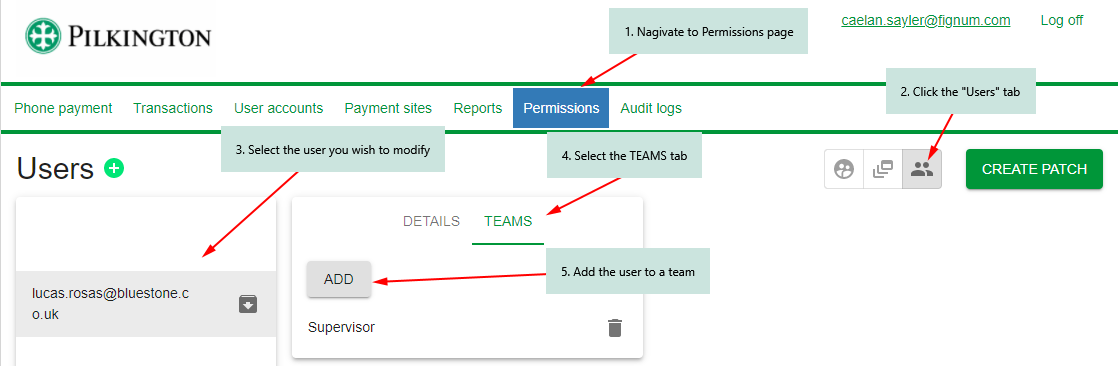
- Navigate to the permissions page
- Click the "Users" tab
- Click the user you wish to modify
- Select the "Teams" tab
- Add the user to a team
Important
The team modifications will appear immediately, but they will not be applied until you create a patch. See below in "Create a Patch" for more information.
Create a Patch
All user/permission changes are submitted as patches. This allows you to create many users or modify permissions for several users, review those changes, and apply them all in one operation.
Once you have created a user and optionally added them to a team, you must click the green "Create Patch" button in the top right. You will then be given a chance to review the pending changes.
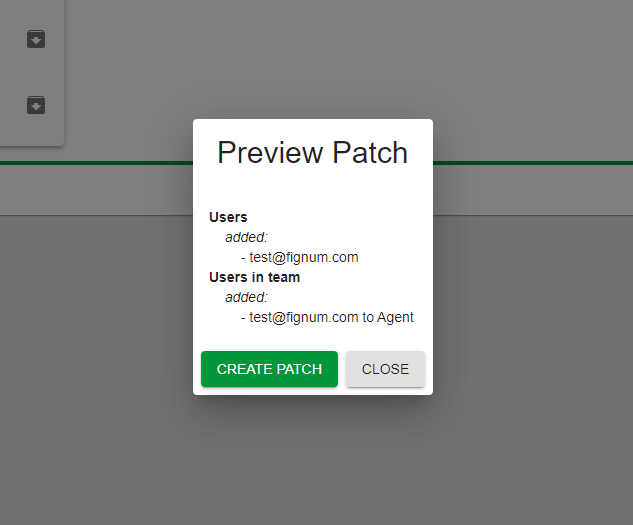
If you are happy when the changes that will be applied, click "Create Patch" again in this dialog to confirm.